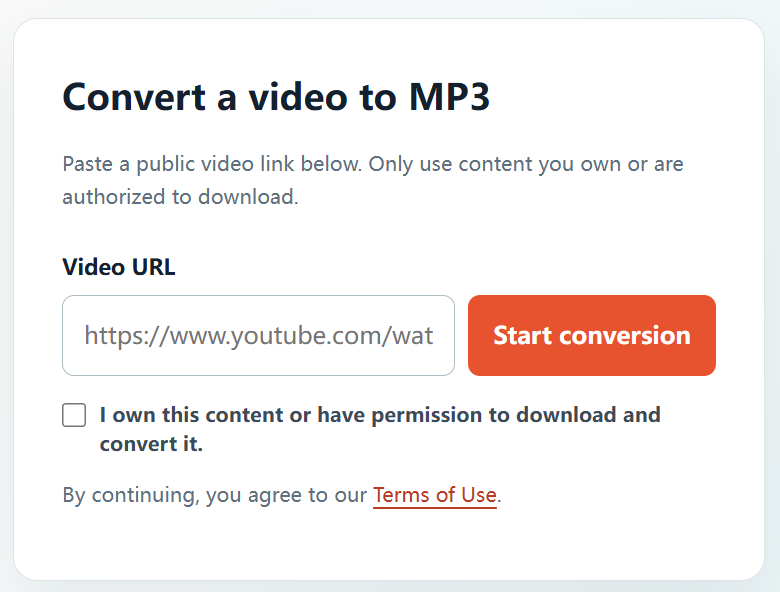
If you need an MP3 from a video you created, licensed, or have been authorized to use, an online converter can make the process convenient. YTBMP3.NET is built around a simple permission-first process for authorized public video links.
When can I download a YouTube video as MP3?
You should have a clear right to make the audio copy. This may be the case when the video is your own upload, was produced for you, is supplied by a client with permission, is in the public domain, or is released under a licence that permits downloading and conversion for your intended use.
If you cannot clearly confirm those rights, do not start a conversion. Contact the creator or copyright owner and ask for permission instead.
How to download an authorized video to MP3
- Confirm authorization. Verify that you own the source material or have permission from the relevant rights holder.
- Copy the public URL. Open the permitted YouTube video and copy the complete address.
- Go to YTBMP3.NET. Visit the homepage converter and paste the link in the Video URL field.
- Tick the permission box. Confirm that you own the content or have authority to download and convert it.
- Start conversion. Select Start conversion and keep the page open until processing is complete.
- Download the MP3. Use the download button once the audio file is ready.
Get the best result
- Use the full, public video URL instead of a partial link or video title.
- Keep your browser open until the conversion is finished, especially for longer videos.
- Do not submit duplicate requests while a conversion is in progress.
- Keep the original source media for your projects whenever you have access to it.
Use the MP3 within the permitted scope
After downloading, use the file only in ways covered by your ownership, permission, or licence. Do not use a converter to bypass access controls, copy private content, or reproduce material you do not have the right to use.
Frequently asked questions
Can I download MP3 from a video on my own channel?
Yes, if you own the video and the underlying audio rights or have the necessary authorization.
Can I download from another person’s public video?
Only if the owner has given you permission or a licence clearly allows the download and conversion you intend to make.
Where should I begin?
Go to the YTBMP3.NET homepage, paste the public URL for your authorized video, confirm your rights, and start the conversion.