MP3 is a convenient audio format for listening to your own video projects, licensed recordings, and other media you are allowed to use. With YTBMP3.NET, the process is simple: provide the public video link, confirm your right to use it, and download the completed MP3 once it is ready.
What you need before converting
Start with a complete public YouTube video URL and make sure you have the required rights. For example, you may be converting a video you uploaded yourself, a client project with permission, public-domain footage, or content released under a suitable reuse licence.
When another person created the video, obtain their permission before converting it. You should also follow any conditions in the applicable licence, including attribution requirements where they apply.
Steps to convert YouTube to MP3
- Check the video rights. Confirm that you own the video or have authorization from the copyright owner.
- Copy the public URL. Copy the full YouTube link for the permitted video.
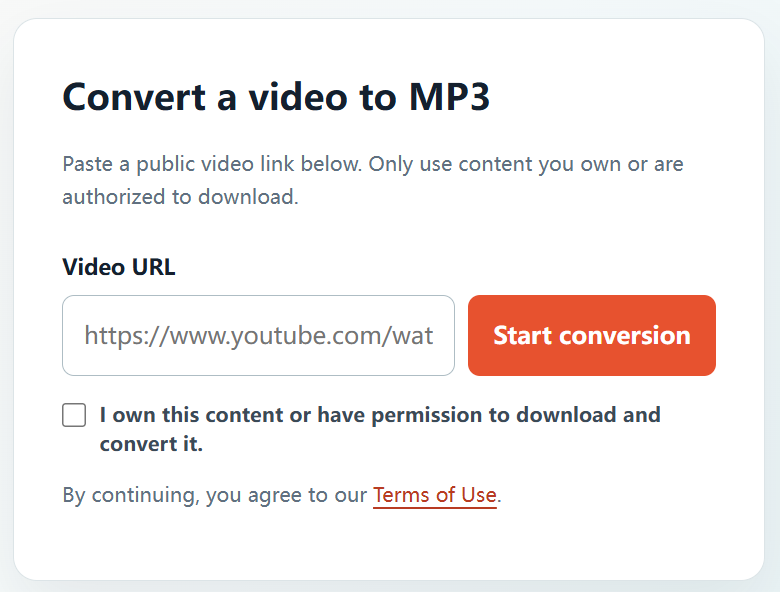
- Open YTBMP3.NET. Visit the homepage converter and paste the link into the Video URL field.
- Confirm your permission. Tick the confirmation box after verifying your right to download and convert the content.
- Start conversion. Select Start conversion and allow the page to remain open while the MP3 is prepared.
- Save the MP3. When the conversion is complete, select Download to save your audio file.
Use MP3 audio responsibly
Keep your MP3 within the scope of the permission or licence you received. Do not use conversion to copy restricted, private, protected, or unlicensed content. For work projects, saving a copy of the permission or licence with your files is a helpful habit.
Why choose YTBMP3.NET?
YTBMP3.NET is built for a direct, easy-to-follow experience. The conversion tool is available on the homepage, supports public video URLs, and asks each user to confirm that they have permission before a conversion begins.
Frequently asked questions
Can I convert my own YouTube video?
Yes. If you own the video and the underlying audio rights, you can use YTBMP3.NET to make an MP3 from your own upload.
Does a public video mean it is free to convert?
No. Public access does not automatically include permission to download or convert. Check with the creator or rights holder when you are unsure.
Where do I start?
Go to the YTBMP3.NET homepage, paste the URL for your authorized video, and complete the permission confirmation before converting.