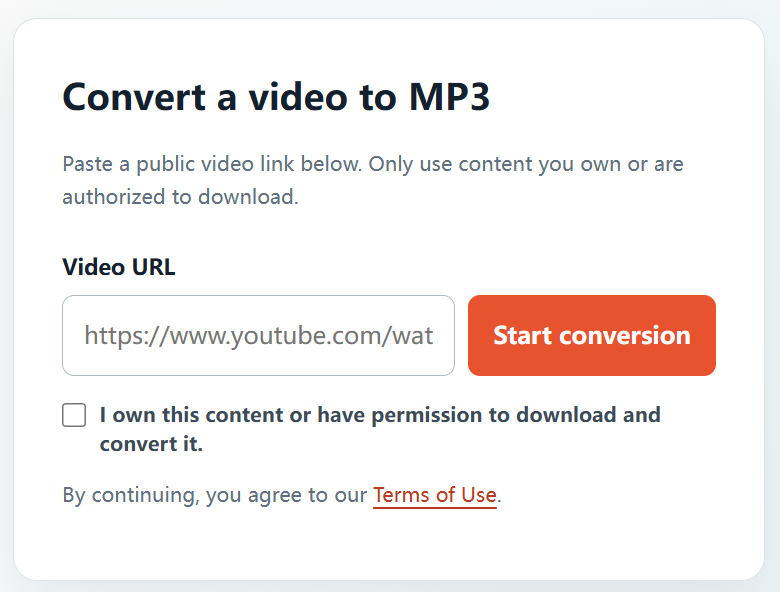
Downloading an MP3 online can be useful when you need the audio from a project you made yourself, a licensed video, or another recording that you have permission to reuse. YTBMP3.NET keeps this process clear: paste an authorized public link, confirm your rights, then download the MP3 after conversion is complete.
Check permission before downloading
Before using an online converter, check who owns the video and audio. Appropriate use cases include your own uploads, client projects where you have written approval, public-domain recordings, and material published under a licence that permits the download and conversion you intend to make.
When the source belongs to someone else, ask the creator or rights holder first. Keep any licence, email approval, or project agreement so you can confirm the permitted use later.
How to download an MP3 online
- Find your authorized video. Open the public YouTube video that you own or are allowed to download.
- Copy the full URL. Copy the link from the browser address bar or the Share menu.
- Open YTBMP3.NET. Visit the homepage converter and paste the link into the Video URL field.
- Confirm your rights. Tick the confirmation box only if you own the content or have permission to download and convert it.
- Start conversion. Select Start conversion and leave the page open while the service prepares the audio.
- Download your file. When the MP3 is ready, select Download to save it to your device.
Online conversion tips
- Use the complete public video URL to avoid link errors.
- Keep the page open until the download button appears, particularly for longer authorized videos.
- Avoid resubmitting the same request while a conversion is already in progress.
- For your own original projects, retain the original source media for the best possible quality.
Use downloaded audio within your permission
An MP3 should only be used in the way your ownership, permission, or licence allows. Do not use online conversion to bypass access restrictions, copy private content, or download media that you do not have the right to use.
Frequently asked questions
Can I download an MP3 from a video I uploaded?
Yes. If you own the uploaded video and the underlying audio rights, you can convert your own video to MP3.
Is every public YouTube video available to download?
No. Public visibility does not mean you have permission to download or convert a video. Always check your rights before submitting a link.
How do I begin?
Visit the YTBMP3.NET homepage, paste the authorized public video URL, and confirm your permission before starting the conversion.