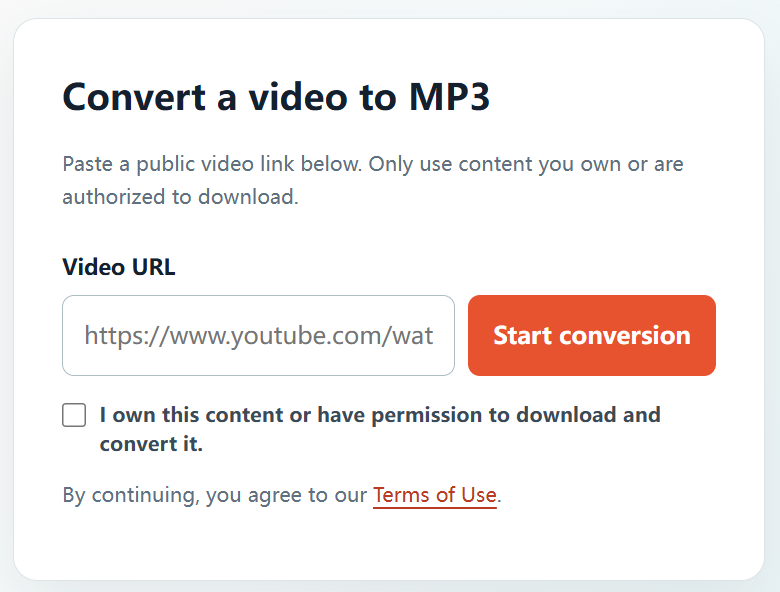
An MP3 copy can be useful for music you created, recordings you have licensed, or other audio where you have permission to make a download. YTBMP3.NET gives you a clear way to prepare that audio from an authorized public video link.
Know what permission you need
Music often involves more than one right. The video upload, the sound recording, and the musical composition may be owned or controlled by different people. You should have permission for the use you intend to make, unless you created the work yourself or it is available under a licence that clearly allows downloading and conversion.
Suitable examples include tracks from your own channel, music commissioned for your project, recordings supplied by a client, public-domain works where the recording rights are also clear, and music distributed under an appropriate reuse licence.
How to download authorized YouTube music as MP3
- Verify your rights. Confirm that you own the music or have permission from the relevant rights holder.
- Copy the public video URL. Open the authorized video and copy its complete YouTube link.
- Open YTBMP3.NET. Go to the homepage converter and paste the link into the Video URL field.
- Confirm authorization. Tick the rights confirmation box only after checking that the download and conversion are permitted.
- Start conversion. Select Start conversion and keep the page open while the MP3 is being prepared.
- Download the MP3. Use the download button when your authorized audio file is ready.
Best practices for music projects
- Keep licence documents, permission emails, or contracts with the project files.
- Follow required credits, attribution, territory, and duration limits in a licence.
- Use the original master or source audio whenever it is available to you.
- Do not download commercial music, private uploads, or other content without the necessary rights.
Why use YTBMP3.NET?
YTBMP3.NET offers a direct, browser-based converter with a clear permission confirmation step. The tool is designed to help users prepare MP3s from authorized public video links while keeping rights awareness at the center of the workflow.
Frequently asked questions
Can I download a song from my own YouTube channel?
Yes, if you own or control the rights needed for the recording and composition, or have the appropriate authorization.
Can I download a public song posted by another artist?
Not without permission or a licence that permits downloading and conversion for your intended use. Public availability alone is not enough.
How do I start?
Visit the YTBMP3.NET homepage, paste the URL for authorized music, confirm your rights, and begin the conversion.